DiplayFuion 1211多显示器控制工具
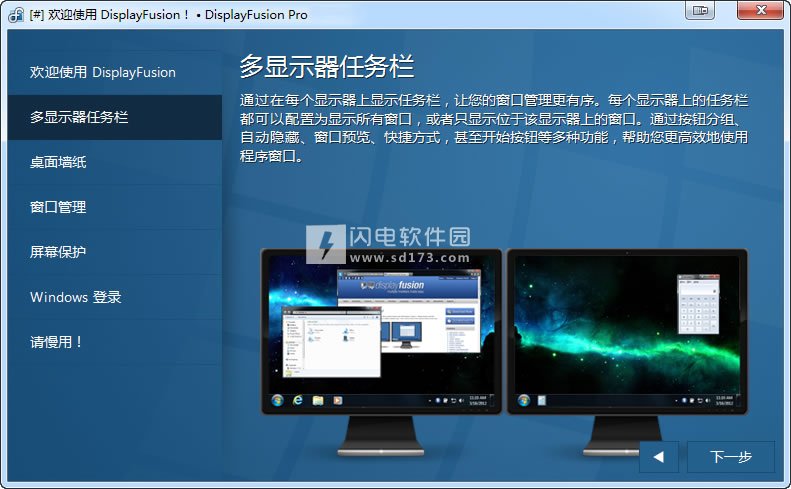
功能介绍
DisplayFusion 快捷键列表:
Ctrl + Win + X 移动窗口到下一个显示器(单显示器下无效)
Ctrl + Win + Z 移动窗口到下一个显示器并且调整到合适尺寸
Ctrl + Win + A 移动窗口到下一个显示器并且最大化
Ctrl + Win + Q 移动窗口到显示器中心
Ctrl + Win + S 移动窗口到显示器中心并且缩小 75%
Ctrl + Win + W 移动窗口到显示器中心并且缩小 95%
Ctrl + Win + ← 移动窗口到显示器左边
Ctrl + Win + → 移动窗口到显示器右边
Ctrl + Win + ↑ 移动窗口到显示器上边
Ctrl + Win + ↓ 移动窗口到显示器下边
DisplayFusion 注册码(激活后,必须设置不自动更新,否则会封掉注册码)
注册码:101-XBM5-33LF-D6NO-CA97-JTlsbGi/GwRzG1La+bRay2dvSU+6YwH9
注册码:101-3NOL-72L6-N7FK-FFBO-JTlsbGi/GwT7EAiAQ39N5Q==
这个是官方绿色免安装版本,下载解压后直接运行DisplayFusion.exe即可启动程序!Final是正式版本,Beta是测试版本!^_^
更新日志:
Change: New Feature: Monitor Fading!
Change: New Trigger Event: Process Starts
Change: New Trigger Event: Process Ends
Change: New Wallpaper Provider: Reddit
Change: Wallpaper and Settings windows open faster now
Change: Major changes to support multi-DPI scaling in Windows 10
Change: Improved Windows 10 compatibility (Anniversary, Creators, and Fall Creators updates)
Change: Scripted Functions now support descriptions
Change: Scripted Function editor now shows exceptions in the output
Change: Renamed “Windows Logon” to “Windows Lock Screen”
Change: Added new scripting functions
Change: Added new Advanced Settings
Change: Support requests now allow file attachments to be sent
Change: DisplayFusion desktop icon now opens the Settings window, instead of seemingly doing nothing
Change: Panaramio removed from DisplayFusion, it’s dead now
Change: Screen Saver Timeout and Password are now always available to change
Change: General improvements and changes
Fix: Alt+Tab windows no longer disappear sometimes
Fix: Wallpaper Abyss uses the new API
Fix: Wallpaper Source selector now works correctly when javascript is disabled in IE
Fix: TitleBar Buttons no longer stop being added to new windows sometimes
Fix: Windows 8.1 hooking compatibility improvements
Fix: Website screen saver now works correctly
Fix: Wallpaper tiling with very small images now works
Fix: Taskbar right-click system tray icons is much improved for all apps
Fix: Resolved an issue that sometimes prevented the Lock Screen from being changed
Fix: Improved Start Menu X compatibility
Fix: Video wallpaper fixes
Fix: Monitor Profile loading improvements
Fix: Resolved some Digital Blasphemy issues
Fix: Improved taskbar button icon compatibility with Metro apps
Fix: Improved font rendering everywhere, especially with DPI scaling
Fix: DisplayFusion windows now focus correctly when opened
Fix: You can no longer create functions with duplicate names
Fix: Full screen detection compatibility improvements
Fix: Resolved an issue with DisplayFusion that caused it to hang when monitors wake up sometimes
Fix: Partly resolved an issue with Malware Bytes Ransomware protection conflicting with the DisplayFusion auto-updater
Fix: Taskbar no longer stays in front of fullscreen windows
Fix: Tiling very small wallpaper images no longer fails
Fix: Right-clicking the Slack/Discord tray icons (and others) now works
Fix: Correctly assigns a primary monitor to splits if needed
Fix: Universal (Metro) apps are no longer reopened when not expected
Fix: “Download with DF” from WallpaperFusion website now works
Fix: Google Image Search is fixed (API change on the Google Servers)
Fix: Alt+Tab no longer shows 6 entries for MS Edge
Fix: WindowBlinds, Start8, and Start10 compatibility improvements
Fix: TitleBar Button preview in the Settings window now uses the correct colour
Fix: Digital Blasphemy now returns the correct sized images
Fix: Resolved some “CleanPath” errors
Fix: No longer “loses” some image files or sources in the Wallpaper window
Fix: Hooking compatibility fixes
Fix: Trigger compatibility improvements
Fix: TitleBar Button compatibility improvements
Fix: Alt+Tab compatibility improvements
Fix: Taskbar compatibility improvements装后先不要运行,使用 Windows 防火墙添加主程序屏蔽联网即可
本帖长期更新最新版 请收藏下载!版权声明:本站提的序列号、注册码、注册机、破解补丁等均来自互联网,仅供学习交流之用,请在下载后24小时内删除。
“DiplayFuion 1211多显示器控制工具” 的相关文章
(注册表清理工具)Wie Regitry Cleaner Pro 1091707
Wise Registry Cleaner是一款免费安全的注册表清理工具。随着系统长时间的使用,一些在使用中积累的注册表垃圾文件会时刻影响到系统性能的发挥,我们须要一些系统优化工具来对自己的电脑进行清理,时刻保持系统的高效性。Wise Registry Cleaner可以安全快速地扫描,查找有效的信息并清理。支持简体中文多语言界面,支持XP下透明界面。该款软件会标识出那些条目是可以安全删除,哪些是…
3D虚拟水族馆屏幕保护 Sim Aquarium Premium 2015 v38 Build 61破解版
sim Aquarium 3D 2013 破解版是一款非常逼真的3D虚拟水族馆屏幕保护程序,也有人称之为3D鱼缸屏保,但这款屏保和之前网上流传的那款截然不同,效果出色很多!程序内置几十种各种鱼类,八大不同的海底场景,效果非常出众!你可以设置为静止10分钟后启动屏保,当电脑10分钟没有任何动作后,你的屏幕就变身为一个漂亮的鱼缸,阳光照射在水面上呈现出一幅波光粼粼的水景,这里有珊瑚,有自由自在游动的鱼…
4DDiG Duplicate File Deleter 3120
4DDiG Duplicate File Deleter是一个非常简单的重复文件查找以及删除清理工具,软件的主界面非常简单,一键点击查找并扫描重复的文件,对于照片类的文件还能对类似的照片进行检测和分析,扫描精准,一边扫一边查看结果,然后您再决定是否要删除这些,避免大量的文件占用你的存储空间。 功能特色 1、删除重复文件 4DDiG Duplicate File Deleter 利用先…
CPU超频工具(EVGA E-LEET Tuning Utility)1104汉化单文件版 (3264位)
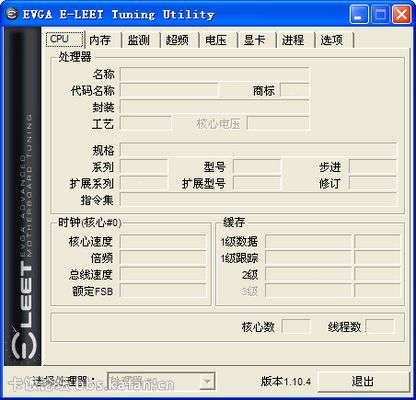
EVGA E-LEET Tuning Utility 是EVGA自行开发,基于CPUID CPU-Z的定制超频软件。这个软件最开始是做为监控工具出现的,可实时监测CPU、内存、QPI频率和电压,后来加入了调整功能,可以实时调整QPI基频,CPU倍频和PCIE总线频率,所以玩家开始拿它来做超频软件使用。 特点: 实时监测CPU、内存、QPI频率和电压 实时监测核心、北桥和电压调节器的温度…
Euing Maze Lock 38汉化注册版 注册码
Eusing Maze Lock除了带有9点解锁方式外,你还可以选择使用16点、25点解锁。后两种意味着你能够使用更加复杂的解锁图案,毕竟简单的图案很容易让其他人记住。首次运行后,软件会给你一个自带的解锁图案(默认是Z),你可以立刻使用或者选择重设。解锁图案除了解除挂机锁之外,在打开软件设置的时候也需要用到,这样可以防止其他人恶意更改你的设定和篡改解锁图案。 在Eusing Maze Lock…
Folder Marker Pro 491 破解版 完美免费中文版附注册码
Folder Marker,这是一个免费的小软件,它能够帮你把选定的文件夹改成指定的颜色,或者改成其他样式的图标。 2013-3-18更新 Folder Marker 4.0发布。 这样一来,使用几天以后,就能够立刻定位自己需要打开的文件夹了,毕竟眼睛对于颜色和样式的敏感程度比文字…
